
Things you should know, things we need input on (#2)

Everyone,
I hope you’re having a great week. We have just a few things:
THINGS YOU SHOULD KNOW ABOUT
We are beginning to build a policies and procedures manual. One of the
first things we put in it is a help document for creating Staff Accounts,
and assigning them permissions in Koha. You can see that document here
https://docs.google.com/document/d/13R2bQWimH5Z-nwKVsbYohDK-YWR2JGf-vY4EeltR4RU/edit?tab=t.9x5l4g9y9ggi.
Be aware that there is currently a bug that Bywater is working on that
requires a backend fix when assigning permissions to a staff account. Until
further notice, please just let one of us know (Marie Hyatt, Rae Schumann,
or Brian Tober) if you have created a staff account with permissions and
the staff member isn’t able to log in.
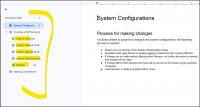
In addition to that document, if you open up the tabs, you will see a
list of all the different user roles in Koha and what is assigned to each
user role. You can see this in Koha as well, but we thought this would be
easier. As you move through each level, you can see which permissions
are added. Hopefully, this will help you determine which role each staff
member should be at.
[image: image.png]
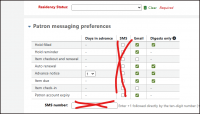
- Koha has an SMS function for notices, but Bywater has indicated that
it is NOT reliable due to different standards on mass texting imposed by
various wireless carriers. It is possible to use a third party vendor, but
there are some kinks we need to work out so at the present, only Nephi
Public Library is set up to use SMS for notices. So, when you create a
patron record, currently, we would recommend that you not select any of the
SMS messaging options for the option messages (Nephi Library Excluded).
Contact me for more information.
[image: image.png]
THINGS WE NEED YOUR INPUT ON.
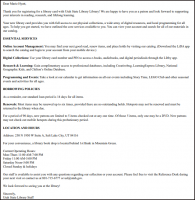
ISSUE 1: Koha has the ability to send out a “Welcome” message when a new
patron record is created. I’ve been customizing those notices for some of
you. This is an example of a customized Welcome Notice:
[image: image.png]
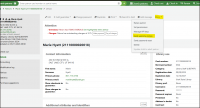
Currently, you can send these notices manually by going to the patron
record, clicking on “More” and then selecting “Send Welcome Notice.” There
is a system configuration that determines whether or not those notices are
sent out automatically with each new patron:
[image: image.png]
The default is set to NOT send automatically, which means that they would
need to be sent manually when the new patron record is created. We need to
know if you want to leave the setting as is, so you can send out the
welcome notices manually as needed, or if you would like to change the
setting so they go out automatically with no needed action from your staff.
[image: image.png]
ISSUE 2: To keep our database as clean as possible as people weed and
remove items from their collections, Rae would like to create a regular
report that will delete any bib records system-wide that have no items
attached to them. Before she does that, she wants to know if there is any
reason why any of you would need to keep a bib record in the system even
though your library, or any other library, does not own a copy and there
are no item records attached to it.
Please use this web form
https://docs.google.com/forms/d/e/1FAIpQLSe7hkrsIOxyEDBK3hlv4QOe8c4VRwn779T7hWIypc1UVZM7lA/viewform?usp=preview
to quickly indicate your preference for the two issues listed above.
Thanks, everyone!!!
Marie D. Hyatt (she/her)
LIBRARY RESOURCES PROGRAM MANAGER
State Library Division https://library.utah.gov/ | 801.715.6756
250 North 1950 West, Ste. A
Salt Lake City, Utah 84116-7901
https://www.facebook.com/UtahStateLibrary/
https://www.instagram.com/utahstatelibrary/
*My email address has changed to mariehyatt@utah.gov mariehyatt@utah.gov.
Please update your address book accordingly. *
Sign up for our newsletter! https://library.utah.gov/publications/
Currently Reading
https://www.goodreads.com/user/email_signature_destination/1894401?utm_medium=reading_link&utm_source=email_signature
[image: Book Cover]
https://www.goodreads.com/user/email_signature_destination/1894401?utm_medium=cover&utm_source=email_signature