
Juniper Library Consortium: Things you should know, things we need input on (#3)

Just a few things this week:
THINGS YOU SHOULD KNOW ABOUT
- In order to keep track of the different emails we are getting from our
member libraries, we would like for you to use a google form to submit a
ticket
https://docs.google.com/forms/d/e/1FAIpQLSfBvhmaTLk2I7M0tNvI8lxKPyJEZ-YIAmO6w9YW6vRalWyguA/viewform
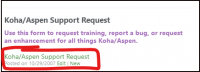
when you have koha/aspen related problems or questions. That can be found
on the Koha home page on the left side bar as seen below. Rae, Brian, and I
all are immediately notified when someone completes that form and we will
do our best to get back to you before the end of the day. If we can't
figure it out for you, we will submit a ticket with ByWater directly. - Last week we asked about Welcome Notices and whether they should be
sent out automatically, everyone said they wanted it automated, rather than
manual. We will leave that setting so it sends them out automatically each
time a patron record is created. If you would like your Welcome notices
customized with your library logo and links to your local policies or
calendars, please put in a ticket and we will take care of that for you. - Our system has been updated to version 25.11. (Both the test and
production servers). If you experience any problems, the first thing you
will want to do is clear your cache on any computer that you use Koha on.
(Do that by going to your browser, settings, privacy & security, clear
cache). If you have any difficulties. Please put in a ticket
https://docs.google.com/forms/d/e/1FAIpQLSfBvhmaTLk2I7M0tNvI8lxKPyJEZ-YIAmO6w9YW6vRalWyguA/viewform
with the JLC admin team. [image: image.png] - We are building a cataloging committee to help you with any cataloging
concerns, do training, etc. If you see a problem with any bib records in
the system please use Koha's reporting feature that will go directly to
India (the USL cataloger) or someone on her committee. You can do that by
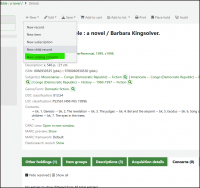
going to the bib record, clicking on "New" and then "New Catalog Concern"
[image: image.png]
- In our last email we asked about Rae running a regular report that
would allow us to delete bib records that had *no item records attached.
*Most of you were just fine with that. Some were worried that we would
delete bib records that you had added for new items but had not had a
chance to add the item record yet. We can run the report so it will only
delete bibs that have been without an item record for 6 months or more. We
will plan on doing that. Please let me know if anyone still sees any issues
with this plan. Be aware that bib records that don't have item records
attached do not show up in Aspen. Only Koha. This will not affect records
that are set to "lost" "withdrawn" "damaged" etc. Those statuses are stored
in the item record so they will not be part of the report. - We have been having some issues with Koha's "Cart to Shelf" feature.
As it sits now, when you check in any item, it will have a temporary shelf
location of "Shelving Cart". After approximately 24 hours (the system runs
this job on the 4th minute of every hour), the shelving location reverts
back to your permanent shelving location, assuming that within that period
of time, library staff will have had time to shelve the item in it's
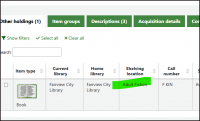
permanent location. Would those of you who are live, please test this and
make sure it is working for you? Check in a book and then set it aside and
check the next day to make sure it has reverted back. When you check it in,
the shelving location should look like something like this:
[image: image.png]
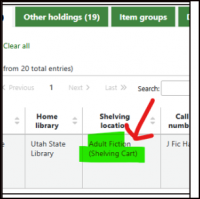
After the 24 hour period, it should just look like this:
[image: image.png]
Be sure that when you look it up the second time, you do so by searching
for it in the catalog, not by checking it in again, because that just
resets the clock.
- Lastly, Morgan County Library goes live on Wednesday the 25th, and
Manti, Ephraim, and Mt. Pleasant (the Central Utah Library Consortium) goes
live the following week on the April 1st! Welcome Morgan County and CULC!
THINGS WE NEED YOUR INPUT ON
- We have had some requests to shorten the time period that an item
stays at that temporary "Shelving Cart" shelving location after it is
checked in. They system setting now is 24 hours. Please complete this quick
form
https://docs.google.com/forms/d/1fYpATrNPPoU_vqzChLLoO9wAJDrvmOjq4tT6y8s1Dyc/preview
to let us know what your preference is.
Marie D. Hyatt (she/her)
LIBRARY RESOURCES PROGRAM MANAGER
State Library Division https://library.utah.gov/ | 801.715.6756
250 North 1950 West, Ste. A
Salt Lake City, Utah 84116-7901
https://www.facebook.com/UtahStateLibrary/
https://www.instagram.com/utahstatelibrary/
*My email address has changed to mariehyatt@utah.gov mariehyatt@utah.gov.
Please update your address book accordingly. *
Sign up for our newsletter! https://library.utah.gov/publications/
Currently Reading
https://www.goodreads.com/user/email_signature_destination/1894401?utm_medium=reading_link&utm_source=email_signature
[image: Book Cover]
https://www.goodreads.com/user/email_signature_destination/1894401?utm_medium=cover&utm_source=email_signature